If you are planning to use OpenRowset queries in order to connet to remote database servers or if you have already implemented OpenRowset queries as a solution to remote connections as an alternative tp linked servers in Microsoft SQL Server 2005, you should first configure the database instance to enable Ad Hoc Distributed Queries in the installed SQL Server database instance where the Ad Hoc query will run.
We should connect to the related SQL Server as an administrator and open a new query window.
To set 'show advanced options' run_value equal to 1 or to enable it, run
sp_configure 'show advanced options', 1reconfigure The return message from the above sql statements for a successful run is as;
Configuration option 'show advanced options' changed from 0 to 1. Run the RECONFIGURE statement to install.
After Advanced Options is enabled, you can again run sp_configure t-sql command and in the returned list of configuration settings, go to row where name is 'Ad Hoc Distributed Queries' and control its run_value.
If 'Ad Hoc Distributed Queries' is turned off for considering server security run_value should be "0"But since we want to enable 'Ad Hoc Distributed Queries' component in order to run 'OpenRowset/OpenDatasource' sql statements, we should set the run_value to "1"
The below sql code is a sample how you can enable a SQL Server configuration parameter.
sp_configure 'Ad Hoc Distributed Queries', 1
reconfigure
The returned message is :
Configuration option 'Ad Hoc Distributed Queries' changed from 0 to 1. Run the RECONFIGURE statement to install.
Now you can see the run_value is set to 1 if you run the "sp_configure" command and control for the "Ad Hoc Distributed Queries" row.
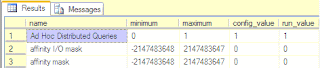
Now you can run your OpenRowset queries successfully from your SQL Server 2005 or SQL Server 2008 (Katmai) databases.


